
Contact CRM, the contact management software
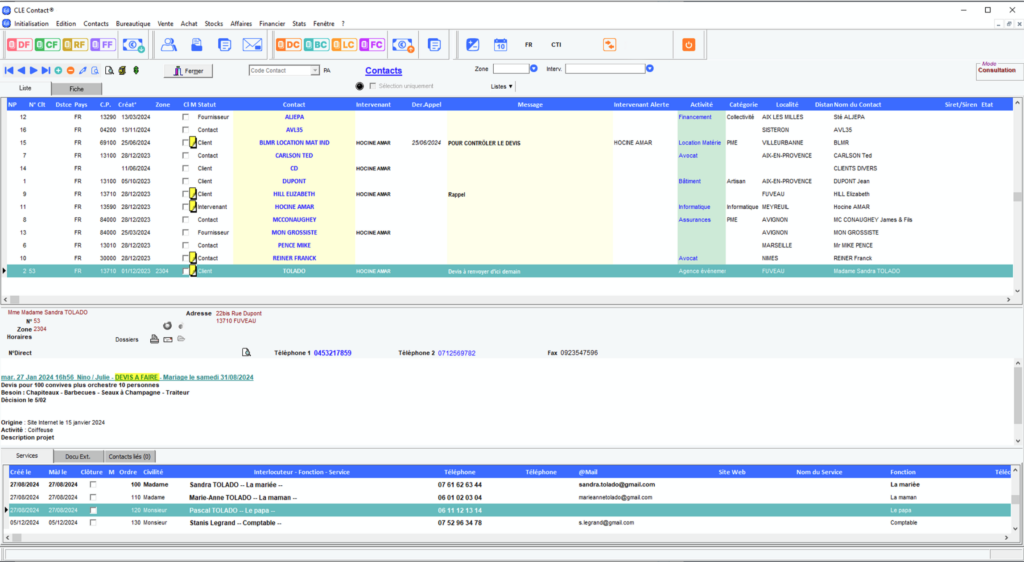
Contact CRM brings together on a single screen everything you know about a customer, a prospect, a supplier or a stakeholder. The record fits into four areas, and the database is the same as the one used for quotes, rentals and invoices.
In brief
What Contact CRM changes on a daily basis
Single screen
The detailed record fits into four areas on one screen. You can see the whole contact without navigating between multiple windows, and without piecing together their history from memory.
A shared base
Contact CRM shares its database with the other modules in the suite. A record created here is used for the quote, the rental and the invoice, without having to re-enter it anywhere.
Scheduled follow-ups
Reminders are scheduled from the contact record. Opportunity tracking identifies prospects right through to their conversion into a customer.
Fields to you
The fields adapt to suit your business. A rental company, a trader and an association do not record the same details on a contact, and the tool keeps pace.
The real cost
The cost of a fragmented customer database
In many businesses, what is known about a customer lives in four places: a spreadsheet of contact details, the inbox of the person who dealt with them, a notebook by the phone, and the memory of someone who is not always there. None of this is wrong. It is simply impossible to find by the time the customer calls.
The price is paid in instalments. The promised follow-up that was never sent. The quote redone because no one could find the previous one. The lead called twice in the same week by two different people. And on the day someone leaves, half the database walks out the door with them.
A contact management software program doesn't make salespeople more diligent. It ensures that what they note down stays put, and that the next person can find it.
The contact card, screen by screen
The detailed CRM Contact record consists of four sections and gives you an instant, comprehensive overview of the contact. Here is each section individually, as it appears.

Zone 1: the contact list
The first area is used to select the contact. The search is multi-criteria, and each record displays its town and postcode. To generate a list of customers from a given area, the CLE MAILING module is used to select by activity and geographical criteria.

Zone 2: general information
The second zone displays the name, address, customer number, telephone numbers, fax number and direct line, as well as opening hours and attached files. The e-mailing tool makes it possible to write to the contact from their profile, without changing software.

Zone 3: the memo
The third zone bears the memo and upcoming follow-ups. It is the place where things that do not fit into any category are deposited: the remark from the last visit, the condition accepted once, the date on which someone must be called back.

Zone 4: the contacts
The final section lists the contacts within the company, including their title, job role, department, direct telephone number, email address and website. On an account where you deal with the warehouse, purchasing and accounts departments, it is this section that prevents you from calling the wrong person.
From prospect to customer, without losing the thread
The Contacts range manages the details for each of your contacts: postal address, telephone number, postcode, email address, website and status, complete with customisable fields. That is the visible part. The part that makes all the difference over the course of a year is the follow-up.
Opportunity tracking
Opportunity tracking tracks prospects right through to their conversion into customers. A live deal ceases to be a mere thought in someone's head and becomes a status readable by the whole team, including whoever takes over the file in August.
Automatic reminders
Automated reminders prevent a follow-up from falling through the cracks. It's the simplest mechanism in Contact CRM, and often the one that yields the most: the majority of lost deals are lost for lack of a reminder, not for lack of persuasion.
The data you keep
A contact list is a personal data file. They cannot be kept indefinitely: the retention period is determined by the purpose for which they were collected, as a reminder the CNIL. This is a question to ask when choosing a tool, rather than when doing the clearing up.
The message book
The message log is displayed by priority, by date, by caller or by number. It keeps internal messages as well as external messages, emails and calls, without depending on a single person's mailbox.
Knowing the whereabouts of the equipment from the customer record
When the CRM serves a hire company, one question comes up more than any other: where is the machine, and with whom. Contact answers this with the visual schedule and the management of check-in and check-out dates, not via a device attached to the machine. The customer's file lists the files associated with them, and the schedule states what has been dispatched, to whom and until when.
This is an organisational response, driven by the movements you log anyway. It is worth whatever the data entry is worth, and it has the advantage of costing nothing in onboard hardware. The schedule details are on the page of the equipment rental software, and the monitoring of site backlogs on that of construction equipment rental software.
No re-entry required
What Contact CRM shares with the rest of the range
Document management
The documents linked to a contact live in the same folder as the commercial and administrative operations. The quote, the contract and the correspondence are not in three different directories.
The mailout
The CLE MAILING module supports your prospecting or information campaigns, featuring multi-criteria selection by activity and geographical area, and dispatch by post, fax or email.
Bookkeeping
A customer's invoices appear in their profile, and the payment schedule shows what is left to collect. The sales information and the accounting information look at the same customer.
The internal messaging system
The internal messaging module circulates an instruction regarding a file without going through everyone's personal email inbox, where it gets lost.
CRM by role
Contact CRM does not sell on its own. Depending on your business, it works with another module in the range, and that is what changes what is recorded on a record.
For an equipment hire company
The client's file contains their rental records, conditions and history. The Contact Location take over on the schedule and releases, and the page of the event equipment rental management software detail the case of sound reinforcement systems, marquee hire and exhibition stand businesses.
For a merchant
The CRM keeps customers and suppliers in the same database, which matters when the latter sometimes become the former. The Trade Contact module covers sales, purchases and stock, and the page of the inventory management software handle availability on a given date.
For a charity
Members, donors and volunteers are contacts with different expectations. The Contact Association module processes memberships and donations, and the CRM keeps the history of the relationship behind it.
Frequently asked questions about Contact CRM
We keep our customers on a spreadsheet. What difference does it make?
A spreadsheet stores contact details, and it does that well. What it doesn't do is schedule a follow-up, show a customer's invoices in their profile, or say which quote is pending with them. Contact CRM shares its database with quotes, rentals and invoicing, so the profile fills itself in as you work.
Can we put suppliers in there, not just customers?
Yes. CRM Contact is the management module for contacts, prospects, customers, suppliers and stakeholders. All four live in the same database, with the same fields on the record card.
How to prevent a follow-up from being forgotten?
Reminders are scheduled from the contact record, in the memo area, and automatic reminders prevent any follow-up from slipping through the net. Meanwhile, opportunity tracking shows the current status of each prospect.
Can we get the list of customers for a department?
Yes. Searching the contacts table is multi-criteria, and each record includes its town and postcode. For a list by sector, the CLE MAILING module selects by activity and geographical criteria, then sends by post, fax or email.
A client has several contacts. How do you manage them?
The fourth section of the form lists the contacts at the client company, including their title, job role, department, direct telephone number, email address and website. You therefore know who to speak to regarding the quote and who to speak to regarding the invoice.
Does the CRM tell you where the hired equipment is located?
The client's file shows the records attached to them, and the visual schedule with entry and exit dates indicates what has been checked out, to whom, and until when. The answer therefore comes from the schedule and the recorded movements, not from a device placed on the machine.
Can we write to the customer from their profile?
Yes, the email tool allows you to write to the contact from the general information area. For bulk mailings, the CLE MAILING module manages prospecting with its own selection.
How long does it take to get the hang of it?
A single screen carries the bulk of the sales work, which limits what there is to learn. Training is provided by ComputerLine, a training organisation registered with the prefecture of the Provence-Alpes-Côte d'Azur region under number 93132385313, and system configuration support is included. For a duration that suits your situation, it is best to discuss it with the team.
View CRM Contact in action
The simplest way is to look at it together on screen, with your contacts and the way you manage them. Tell us how many records you manage and which module in the range you work with. The full range is presented on the page of Contact software solutions.